Overview
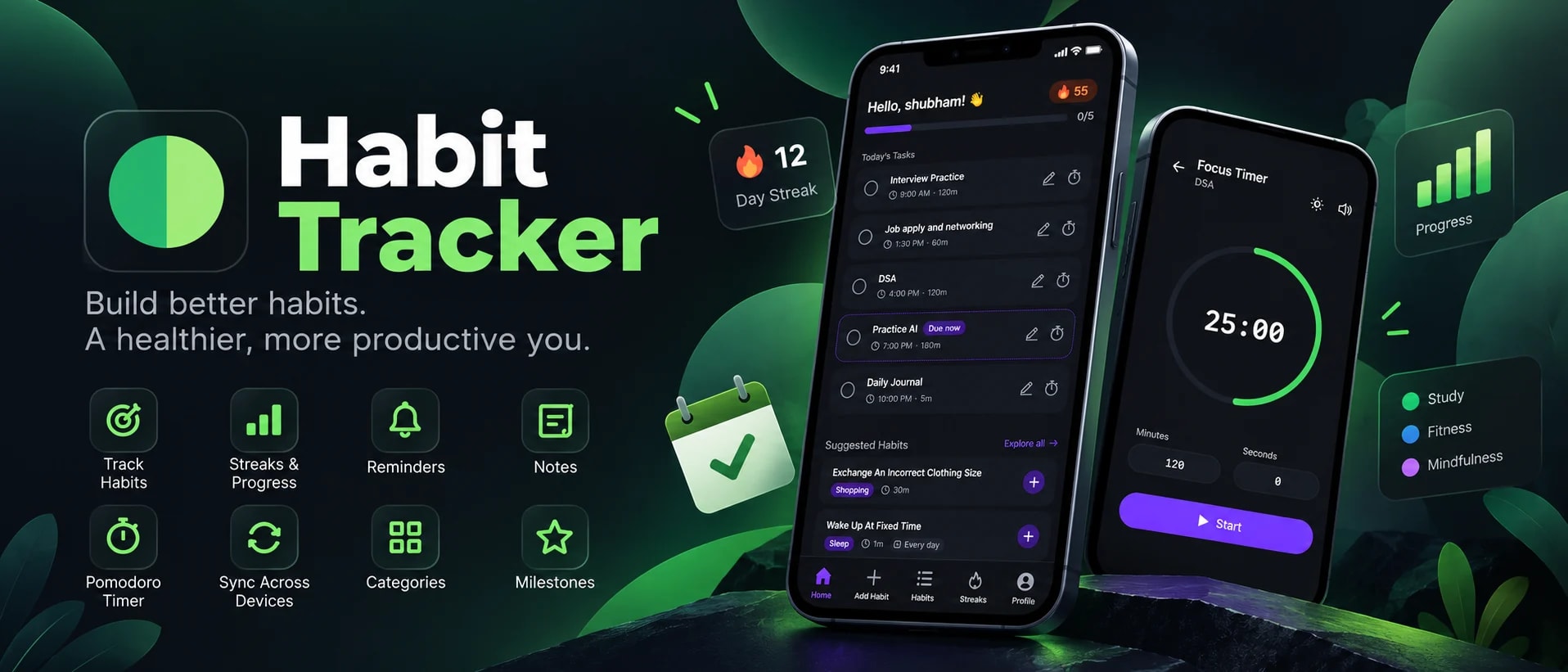
I built Habit Tracker as a full-stack application for people who want a practical system for building and maintaining daily routines. Instead of treating habits as simple checkboxes, I designed the application around scheduling, streaks, reminders, notes, focused work, and an AI assistant that can manage habits through natural language.
The product runs as a web application and is also packaged as a native Android application using Capacitor. Behind the UI, it uses a Node.js API, MongoDB, Redis, a separate Go background worker, Firebase Cloud Messaging, and an AI layer built with LangChain and LangGraph.
The Problem
Habit tracking can become ineffective when users have to repeatedly manage schedules, remember tasks, calculate progress, and manually maintain different pieces of information. A useful system needs to handle different types of recurring activities while making progress visible and reminding users at the right time.
I wanted to build a system where a user could define a habit once, choose how it repeats, receive reminders, track completion and streaks, attach notes, and use the same account across devices. I also wanted to experiment with a more natural interface where users could manage their habits without navigating through multiple forms.
What I Built
The application is divided into a React frontend, a Node.js and Express API, and a separate Go worker responsible for background processing and notifications. This separation keeps user-facing API operations independent from scheduled jobs and notification processing.
Habit Management
The main feature is flexible habit management. Users can create, edit, archive, and delete habits and define different repeat patterns instead of being limited to a simple daily checklist.
Streak Tracking
I implemented streak tracking around consecutive habit completions so users can see whether they are maintaining consistency. The application stores streak information and exposes streak history through the backend and frontend.
This turns completion history into a more useful feedback mechanism. Instead of only knowing whether a habit was completed today, users can see the continuity of their behavior over time.
AI Habit Assistant
One of the engineering-focused parts of the project is the AI chat assistant. I integrated LangChain and LangGraph with OpenAI GPT-4.1-mini to create an assistant that can work with the application's habit data.
The assistant is designed around tools and application actions rather than being limited to generating text. Users can use natural language to create, edit, list, and manage habits, reducing the amount of manual navigation required for common operations.
Background Processing and Notifications
Notifications are handled outside the main API through a dedicated Go worker. The worker contains scheduler logic for background jobs, reads user and habit information from MongoDB, uses Redis for pub/sub and caching, and sends push notifications through the Firebase Admin SDK.
This architecture separates scheduled and asynchronous work from the request-response API. The worker also contains stale-data cleanup, image handling, and structured logging using Uber Zap.
Authentication and Account Management
I implemented multiple authentication and account-management flows instead of relying on a single login method.
Notes and Journaling
I added notes because completion data alone does not always explain what happened around a habit. Users can attach notes to habits or maintain standalone journal entries, giving them a place to record observations, context, or reflections.
Suggested Habits
To reduce the friction of starting from an empty habit list, the application includes a pre-seeded library of suggested habits. Users can browse suggestions and add useful habits instead of having to define every routine from scratch.
Focus Timer
Some habits represent activities that require dedicated time, such as studying or practicing a skill. I therefore added a built-in timer for timed habits, allowing users to start a focused session directly from the application.
Frontend Architecture
The frontend is built with React 19 and Vite. I use React Router for navigation, Redux Toolkit for global state management, Tailwind CSS for styling, and Radix UI and shadcn components for accessible UI primitives.
The frontend is organized around feature areas such as authentication, habits, streaks, AI chat, notes, timer, home dashboard, profile, and navigation. This keeps the UI code separated by product functionality rather than placing all components into a single structure.
Backend Architecture
The backend uses Node.js with Express 5 and follows a controller, model, router, middleware, helper, and utility structure. Mongoose models represent users, habits, streaks, notes, suggested habits, devices, and feedback.
I also added Zod for schema validation and express-rate-limit for API rate limiting. The backend exposes separate API areas for users, streaks, AI chat, notes, suggested habits, devices, application version information, and health checks.
Go Worker Architecture
The Go service is intentionally separate from the Node.js API. It contains the scheduler, notification handling, Firebase integration, MongoDB helpers, Redis integration, cleanup logic, image handling, and structured logging.
The worker can run directly with Go or inside Docker. This gave me a practical way to introduce Go into a production-style full-stack application without forcing the entire API to use a second backend language.
Android Application
Instead of maintaining a completely separate Android frontend, I use Capacitor to package the React application as an Android application. The Android project lives alongside the frontend and can be synchronized from the web build using Capacitor tooling.
This approach lets the same product logic and UI serve the web application and Android application while still allowing Android-specific capabilities such as push notifications.
Data and Infrastructure
Engineering Challenges
The project required solving problems across several parts of a real application rather than focusing only on the UI. I had to coordinate authentication, recurring schedules, streak calculations, persistent state, background jobs, push notifications, AI tool execution, device registration, and multiple clients.
A particularly important architectural decision was separating background processing from the API. Habit reminders and scheduled work should not depend on a user keeping a web page open or on an API request remaining active. The Go worker provides a dedicated place for these asynchronous responsibilities.
Security and Reliability
The backend uses JWT authentication, Google OAuth verification, request validation with Zod, and rate limiting. Authentication-related operations include access and refresh token handling, email verification, password reset, and account deletion.
For notifications and asynchronous processing, device tokens are registered through authenticated API requests and consumed by the worker when sending Firebase Cloud Messaging notifications.
Technology Stack
Result
The result is a complete habit-management platform rather than a simple checklist application. It combines recurring habit scheduling, multiple habit types, streaks, reminders, notes, suggested habits, a focus timer, AI-assisted management, authentication, and cross-device access into one system with a separate background-processing layer.
The project gave me the opportunity to work across frontend architecture, REST API design, authentication, database modeling, Redis, background processing in Go, push notifications, AI agent orchestration, Android packaging, and deployment as one integrated product.
Project Structure
habit/
├── backend/              # Node.js + Express API server
├── worker/               # Go background worker
└── frontend/             # React web and Android application
    └── android/          # Capacitor Android project
Links
The application is available as a web application and as an Android application through Google Play.